Developer Guide
- Acknowledgements
- Setting up, getting started
- Design
- Implementation
- Documentation, logging, testing, configuration, dev-ops
- Appendix: Requirements
- Appendix: Instructions for manual testing
Acknowledgements
- This project is based on the AddressBook-Level3 project created by the SE-EDU initiative.
- {list here sources of all reused/adapted ideas, code, documentation, and third-party libraries – include links to the original source as well}
Setting up, getting started
Refer to the guide Setting up and getting started.
Design
 Tip: The
 .puml files used to create diagrams in this document can be found in the diagrams folder. Refer to the PlantUML Tutorial at se-edu/guides to learn how to create and edit diagrams.
Architecture
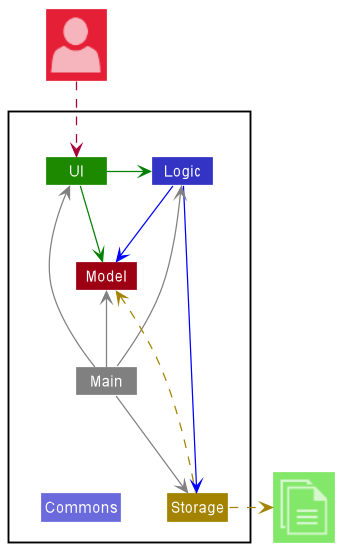
The Architecture Diagram given above explains the high-level design of the App.
Given below is a quick overview of main components and how they interact with each other.
Main components of the architecture
Main has two classes called Main and MainApp. It is responsible for,
- At app launch: Initializes the components in the correct sequence, and connects them up with each other.
- At shut down: Shuts down the components and invokes cleanup methods where necessary.
Commons represents a collection of classes used by multiple other components.
The rest of the App consists of four components.
-
UI: The UI of the App. -
Logic: The command executor. -
Model: Holds the data of the App in memory. -
Storage: Reads data from, and writes data to, the hard disk.
How the architecture components interact with each other
The Sequence Diagram below shows how the components interact with each other for the scenario where the user issues the command delete 1.
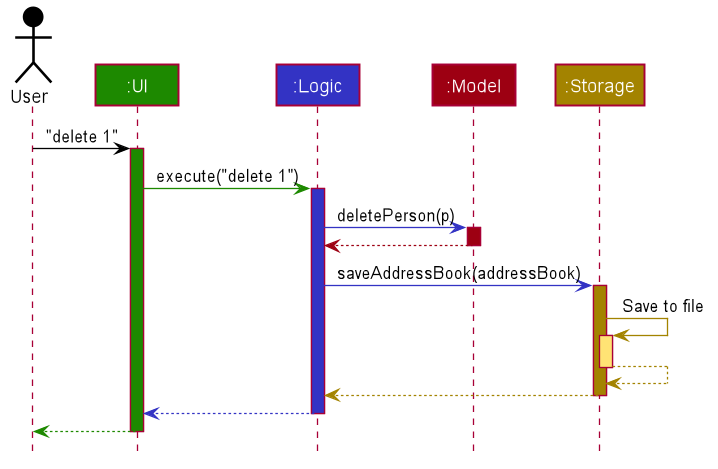
Each of the four main components (also shown in the diagram above),
- defines its API in an
interfacewith the same name as the Component. - implements its functionality using a concrete
{Component Name}Managerclass (which follows the corresponding APIinterfacementioned in the previous point.
For example, the Logic component defines its API in the Logic.java interface and implements its functionality using the LogicManager.java class which follows the Logic interface. Other components interact with a given component through its interface rather than the concrete class (reason: to prevent outside component’s being coupled to the implementation of a component), as illustrated in the (partial) class diagram below.
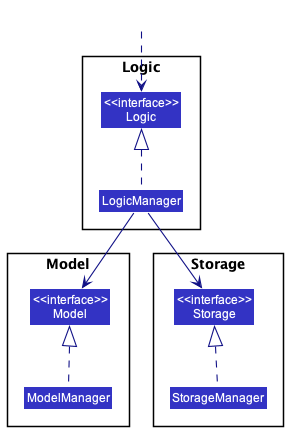
The sections below give more details of each component.
UI component
The API of this component is specified in Ui.java
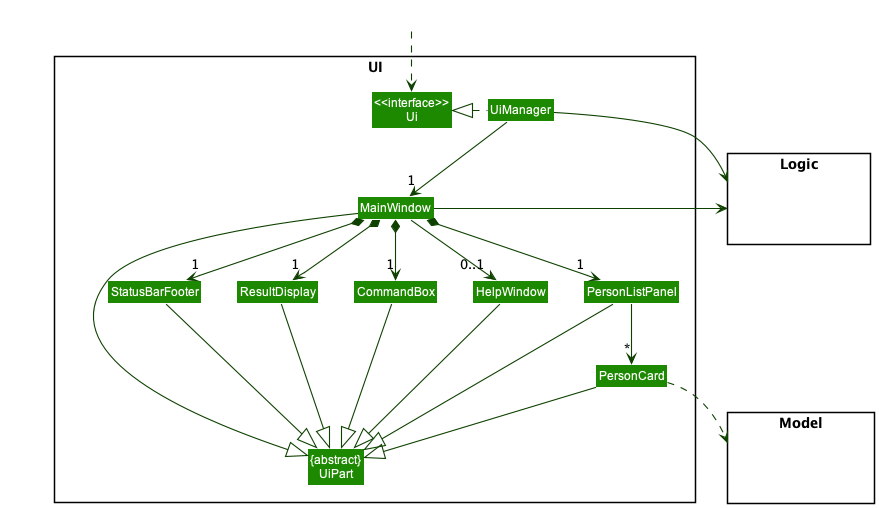
The UI consists of a MainWindow that is made up of parts e.g.CommandBox, ResultDisplay, PersonListPanel, StatusBarFooter etc. All these, including the MainWindow, inherit from the abstract UiPart class which captures the commonalities between classes that represent parts of the visible GUI.
The UI component uses the JavaFx UI framework. The layout of these UI parts are defined in matching .fxml files that are in the src/main/resources/view folder. For example, the layout of the MainWindow is specified in MainWindow.fxml
The UI component,
- executes user commands using the
Logiccomponent. - listens for changes to
Modeldata so that the UI can be updated with the modified data. - keeps a reference to the
Logiccomponent, because theUIrelies on theLogicto execute commands. - depends on some classes in the
Modelcomponent, as it displaysPersonobject residing in theModel.
Logic component
API : Logic.java
Here’s a (partial) class diagram of the Logic component:
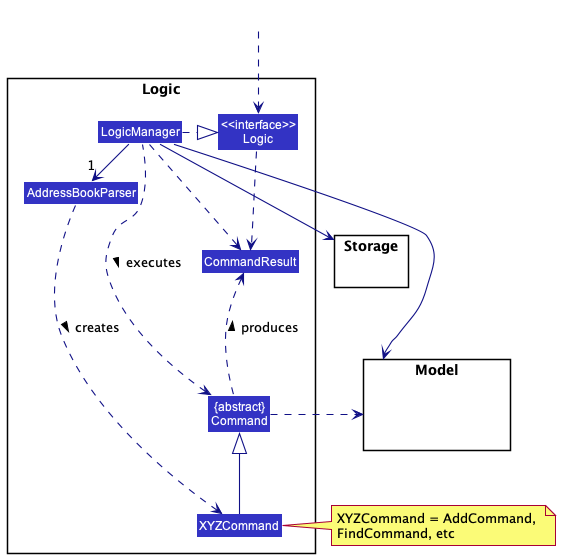
How the Logic component works:
- When
Logicis called upon to execute a command, it uses theAddressBookParserclass to parse the user command. - This results in a
Commandobject (more precisely, an object of one of its subclasses e.g.,AddCommand) which is executed by theLogicManager. - The command can communicate with the
Modelwhen it is executed (e.g. to add a person). - The result of the command execution is encapsulated as a
CommandResultobject which is returned back fromLogic.
The Sequence Diagram below illustrates the interactions within the Logic component for the execute("delete 1") API call.
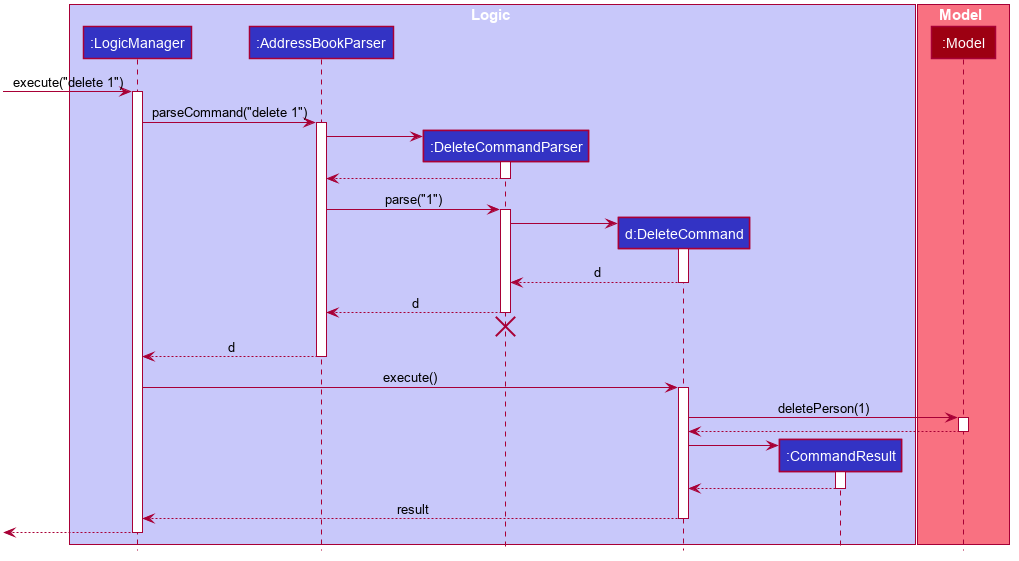
 Note: The lifeline for
 DeleteCommandParser should end at the destroy marker (X) but due to a limitation of PlantUML, the lifeline reaches the end of diagram.
Here are the other classes in Logic (omitted from the class diagram above) that are used for parsing a user command:
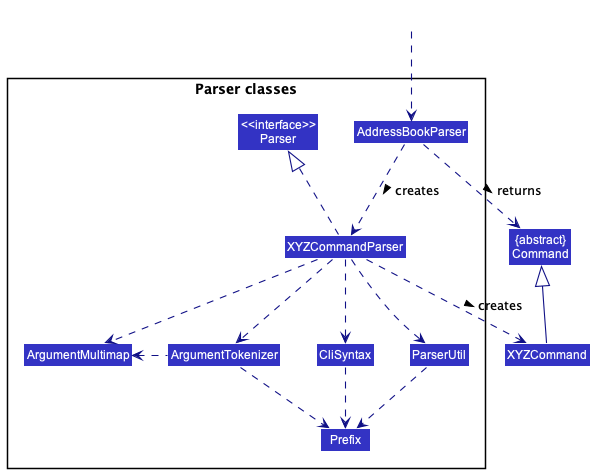
How the parsing works:
- When called upon to parse a user command, the
AddressBookParserclass creates anXYZCommandParser(XYZis a placeholder for the specific command name e.g.,AddCommandParser) which uses the other classes shown above to parse the user command and create aXYZCommandobject (e.g.,AddCommand) which theAddressBookParserreturns back as aCommandobject. - All
XYZCommandParserclasses (e.g.,AddCommandParser,DeleteCommandParser, …) inherit from theParserinterface so that they can be treated similarly where possible e.g, during testing.
Model component
API : Model.java
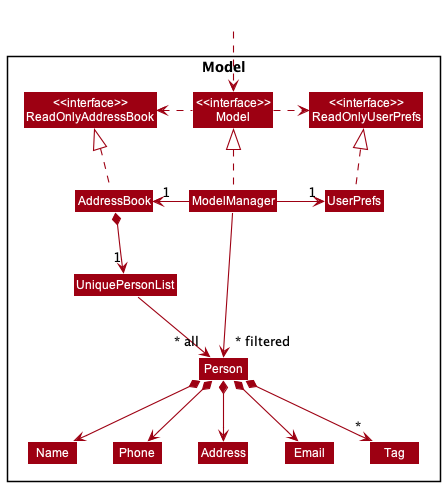
The Model component,
- stores the address book data i.e., all
Personobjects (which are contained in aUniquePersonListobject). - stores the currently ‘selected’
Personobjects (e.g., results of a search query) as a separate filtered list which is exposed to outsiders as an unmodifiableObservableList<Person>that can be ‘observed’ e.g. the UI can be bound to this list so that the UI automatically updates when the data in the list change. - stores a
UserPrefobject that represents the user’s preferences. This is exposed to the outside as aReadOnlyUserPrefobjects. - does not depend on any of the other three components (as the
Modelrepresents data entities of the domain, they should make sense on their own without depending on other components)
Note: An alternative (arguably, a more OOP) model is given below. It has a Tag list in the AddressBook, which Person references. This allows AddressBook to only require one Tag object per unique tag, instead of each Person needing their own Tag objects.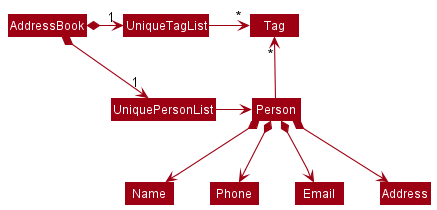
Storage component
API : Storage.java
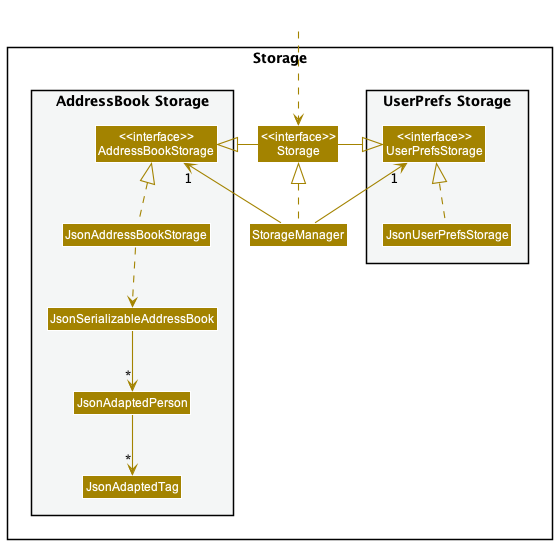
The Storage component,
- can save both address book data and user preference data in json format, and read them back into corresponding objects.
- inherits from both
AddressBookStorageandUserPrefStorage, which means it can be treated as either one (if only the functionality of only one is needed). - depends on some classes in the
Modelcomponent (because theStoragecomponent’s job is to save/retrieve objects that belong to theModel)
Common classes
Classes used by multiple components are in the bookopedia.commons package.
Implementation
This section describes some noteworthy details on how certain features are implemented.
Mark delivery feature
Implementation details
The mark delivery feature is supported by DeliveryStatus enumerable that represents the possible delivery statuses:
- DONE (delivery that has been completed)
- OTW (delivery that is in progress)
- FAILED (delivery that failed to deliver)
- PENDING (delivery that is still pending)
A new command argument prefix, s/, is assigned to capture delivery status argument. The argument has to be either lowercase or uppercase of the aforementioned statuses.
The Person class will have an attribute deliveryStatus of type DeliveryStatus to indicate the status of the delivery.
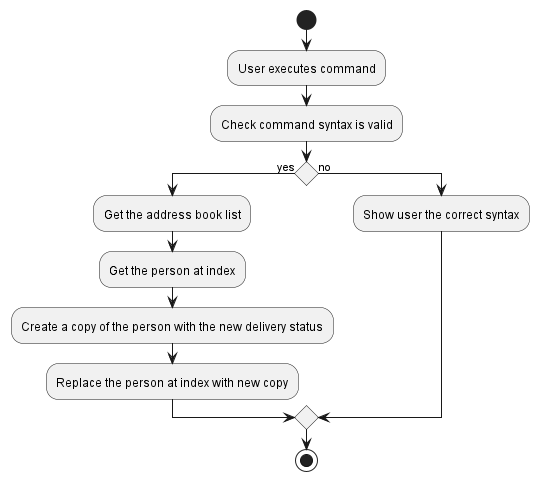
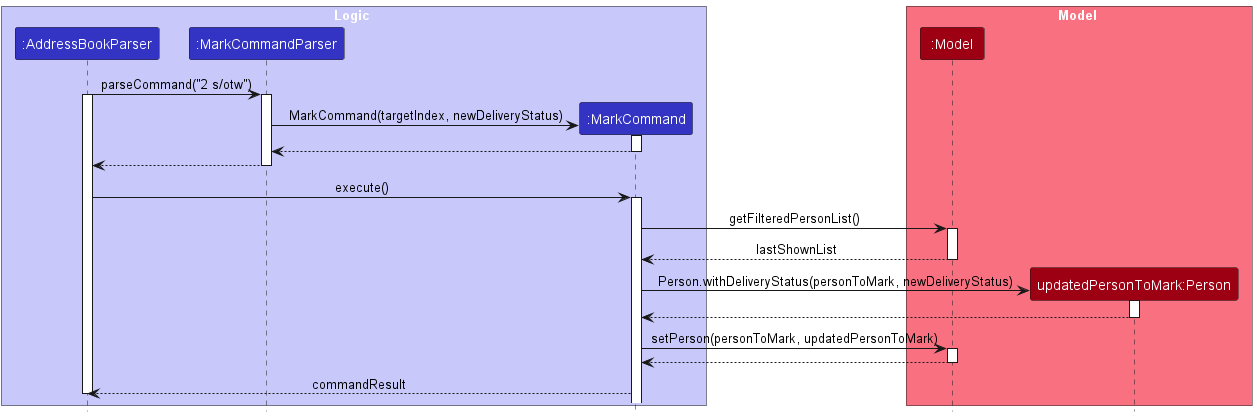
The MarkCommand will update the delivery status of the target Person with the aforementioned statuses. Before MarkCommand is created, MarkCommandParser checks if the command arguments are of the correct format. The command requires both the index and the status. MarkCommand will then be executed: it will first get the current address book list, get the target person at the index, create a copy of the person with the new status, and then replacing the target person with its new copy.
The following activity diagram summarizes what happens when a user executes the mark delivery command.
The following sequence diagram shows the interaction between the objects when a user executes the mark delivery command.
Design Considerations
-
Alternative 1:
- Add
DeliveryStatusasParcel’s attribute- May be too complicated for user’s understanding, hence kept it simple
- Delivery rider delivers all parcels at one go for a recipient
- Add
-
Alternative 2 (implemented):
- Add
DeliveryStatusasPerson’s attribute- Mark all parcels under a person as delivered in one go
- Simple for the user to understand and easy to implement for the developer
- Add
Add Parcel to Delivery feature
Implementation Details
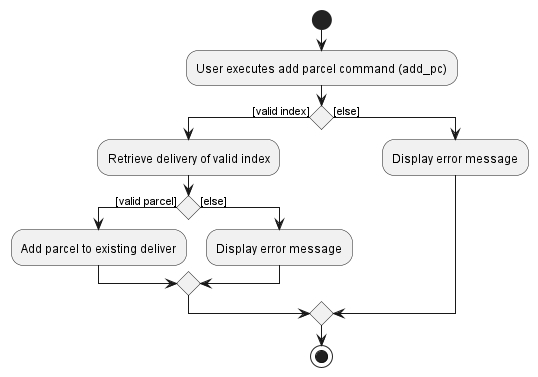
The adding of a parcel uses a new command argument prefix, pc/, to capture the parcel’s name.
The AddParcelCommand will add in a new Parcel to the target Person indicated by the given user index.
Before AddParcelCommand is created, AddParcelCommandParser checks if the command arguments are of the correct format, AddParcelCommand requires the person index and the parcel.
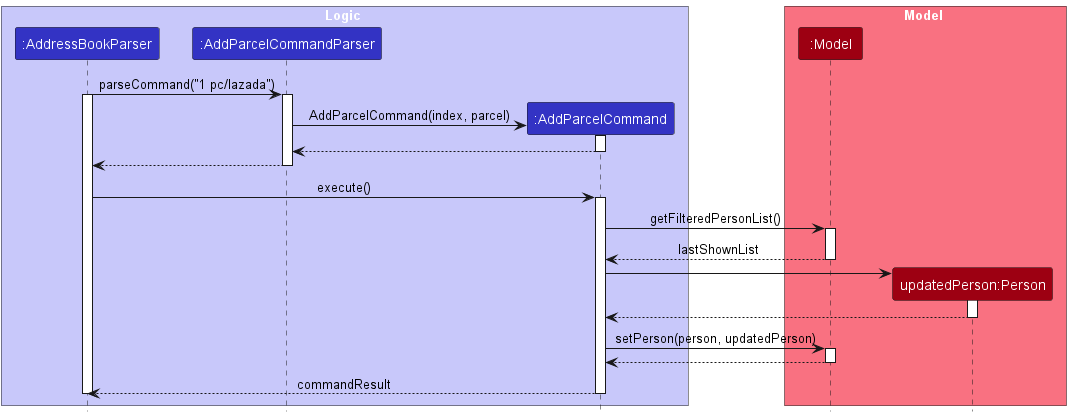
AddParcelCommand will then be executed: it will first retrieve the current address book list, get the target person at the given index, create a copy of the person with the newly added parcel, and then replacing the target person with its new copy.
The following activity diagram summarizes what happens when a user tries to add a parcel to an existing delivery.
The following sequence diagram shows the interaction between the objects when a user executes the add parcel command - add_pc 1 pc/lazada.
Design Considerations
Aspect: Number of parcel(s) to be added in each command
-
Alternative 1 (current choice): 1 parcel at a time
- Pros: Easy to implement, less prone to errors
- Cons: A little more troublesome for users to repeatedly type
add_pceach time
-
Alternative 2: Allowing multiple parcels to be added at a time
- Pros: Seems more convenient for user as command line
add_pcwill not need to be repeated - Cons: More prone to user errors
- Pros: Seems more convenient for user as command line
Mark Parcel feature
Implementation Details
The mark parcel feature is supported by ParcelStatus enumerable that represents the possible parcel statuses:
- FRAGILE (parcel that needs to be handled with care)
- BULKY (parcel that needs to be handled with extra assistance e.g. trolley)
- More types of statuses can be added in the future
The command argument prefix, pc/ is now used to capture the parcel’s index of the target person.
Additionally, s/, is used to capture the parcel status argument.
The argument can either be lowercase or uppercase of the aforementioned statuses.
The Parcel class will have variables isFragile and isBulky to indicate the status of the parcel, as a parcel can take up any number of statuses (>= 0).
The MarkParcelCommand will update the statuses of the target Parcel of the target Person with the aforementioned statuses.
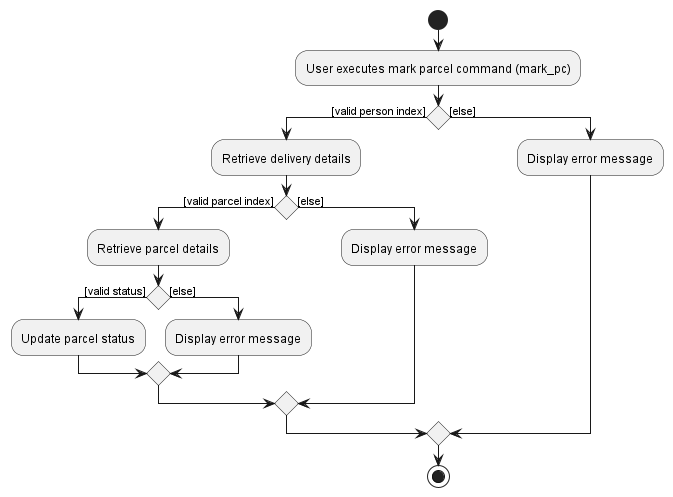
Before MarkParcelCommand is created, MarkParcelCommandParser checks if the command arguments are of the correct format, MarkParcelCommand requires the person index, parcel index and the status.
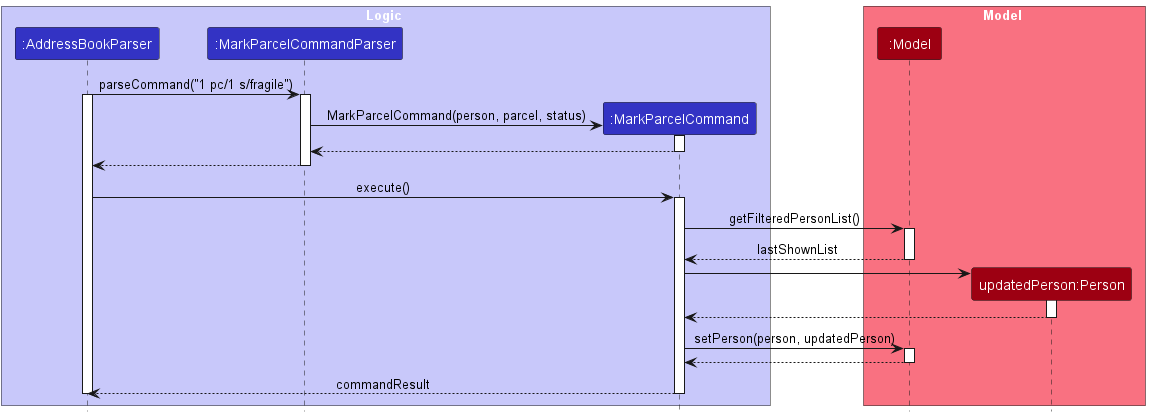
MarkParcelCommand will then be executed: it will first retrieve the current address book list, get the target parcel of the target person, create a copy of the person with the new updated parcel, and then replacing the target person with its new copy.
The following activity diagram summarizes what happens when a user tries to mark a parcel.
The following sequence diagram shows the interaction between the objects when a user executes the mark parcel command - mark_pc 1 pc/1 s/fragile.
Design Considerations
Aspect: Method to choose which parcel to be marked
-
Alternative 1: Name of parcel
- Pros: Easier to implement as parcel can be immediately found based off name
- Cons: More prone to user errors
-
Alternative 2 (current choice): Index of parcel
- Pros: Less prone to user errors, as the full name of parcel do not have to be typed out
- Cons: Harder to implement as will have to keep track of parcel list for each person
Aspect: Number of statuses a parcel can have
-
Alternative 1: Each parcel only have one status
- Pros: Easier to implement with the use of
ParcelStatusenumerable only - Cons: In reality, a parcel can have more than one status (e.g. a parcel can be both bulky and fragile at the same time)
- Pros: Easier to implement with the use of
-
Alternative 2 (current choice): Each parcel only have any number of statuses
- Pros: A parcel can now have more than one status
- Cons: Harder to implement as just using the
ParcelStatusenumerable won’t suffice
View Delivery feature
Implementation Details
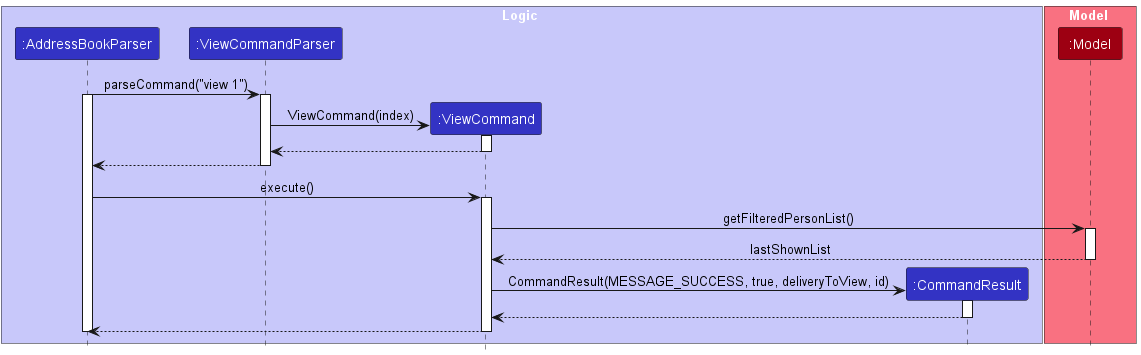
The feature is implemented by making use of the Index class to select a recipient of choice from the list of person that is part of the Model component.
The ViewCommand will display all the delivery details (i.e. parcels, address, contact information, etc.) of the selected recipient under the CommandResult class.
The following partial sequence diagram will show how the view delivery feature is implemented
Design Considerations
Aspect: The method to select recipient
-
Alternative 1 (current choice): Use the
Indexclass to select recipient from the list- Pros: Easy to implement,
Indexfor each person is unique - Cons: Have to execute
ListCommandto obtainIndexof recipient of interest
- Pros: Easy to implement,
-
Alternative 2: Use the name of the recipient to select
- Pros: Physical parcels have the names of recipient on it, making it easy to locate the delivery details of said person
- Cons: Names may not be unique, it is possible to obtain the wrong delivery details
Sort feature
Implementation Details
The sort feature has been implemented to enable users to organize and arrange the delivery list ordered by Delivery Status.
The SortCommand invokes a sorting on the current list of deliveries and subsequently displays the newly sorted list.
The following partial sequence diagram will show how the view delivery feature is implemented
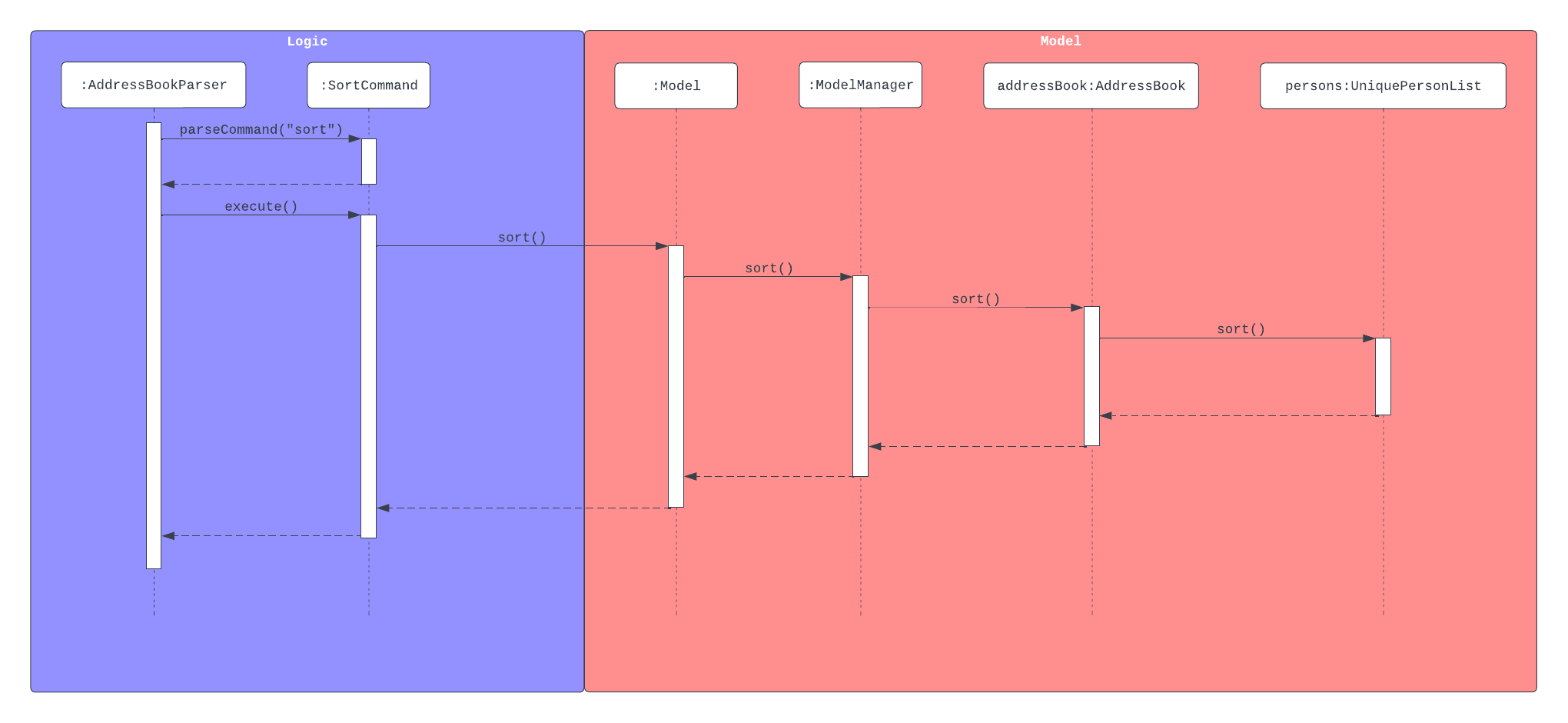
The implementation of the sort feature involves the following steps:
-
Identify the data:
- The data to be sorted is the list of persons that is part of the
Modelcomponent.
- The data to be sorted is the list of persons that is part of the
-
Sorting criteria:
- The list is sorted according to the Delivery Status of each entry in ascending order.
- Ordering:
PENDING<OTW<DONE<FAILED - Entries with the same Delivery Status are sorted in ascending alphabetical order of name.
-
Invoke sort:
- The list being stored in the
Modelcomponent is sorted and replaces the previous list.
- The list being stored in the
-
Displaying the sorted data:
- As the sort command automatically replaces the previous list with the newly sorted list, the address book being shown to the User is always updated.
Design Considerations
Aspect: How to specify sorting criteria
-
Alternative 1 (current choice): Predefines the sorting criteria to Delivery Status
- Pros: Easy to implement, there is already a defined ordering for Delivery Status
- Cons: Limits functionality of the sort command
-
Alternative 2: User specifies sorting criteria when typing the command
- Pros: Gives the user higher functionality by allowing the user to sort the list of deliveries in various orderings.
- Cons: Parsing the user specified sorting criteria is difficult to implement and unnecessarily complicates the logic.
Documentation, logging, testing, configuration, dev-ops
Appendix: Requirements
Product scope
Target user profile:
- has a need to manage a significant number of deliveries
- requires the ability to track, monitor and update the status of deliveries
- shows a preference for desktop applications
- has proficient typing skills
- prefers typing to mouse-based interactions
- is reasonably comfortable using CLI apps
Value proposition: optimize delivery management through an application that utilizes CLI commands, providing a more efficient alternative to conventional mouse-driven GUI applications.
User stories
Priorities: High (must have) - * * *, Medium (nice to have) - * *, Low (unlikely to have) - *
| Priority | As a … | I want to … | So that I can… |
|---|---|---|---|
* * * |
parcel delivery rider (basic) | view all my deliveries | I can view my future deliveries as well |
* * * |
parcel delivery rider (basic) | view a specific delivery | I can view the details of the delivery |
* * * |
parcel delivery rider (basic) | delete a delivery | I can delete the delivery if I input it wrongly |
* * * |
parcel delivery rider (basic) | add deliveries | I can add new delivery jobs |
* * * |
parcel delivery rider (basic) | mark a delivery in progress | I can keep track of which deliveries is in progress |
* * * |
parcel delivery rider (basic) | mark a delivery as done | I can keep track of which deliveries are done |
* * * |
parcel delivery rider (basic) | mark a delivery as failed | I can keep track of which deliveries have failed to be delivered |
* * * |
parcel delivery rider (basic) | check what specific parcel I need to deliver to a specific address | I will delivery the correct parcel to the correct customers |
* * |
parcel delivery rider (basic) | add parcels to existing deliveries | I do not have to recreate a delivery |
* * |
parcel delivery rider (basic) | see the phone number of the customer | I can contact the customer if there is no response at the address |
* * |
parcel delivery rider (basic) | view the number of failed attempts | I know which deliveries have multiple failed attempts |
* * |
parcel delivery rider (intermediate) | see the weight of the parcels | I can carry the appropriate amount of parcels |
* * |
parcel delivery rider (intermediate) | mark parcels as fragile | I can be more careful for fragile parcels |
* * |
parcel delivery rider (intermediate) | mark parcels as bulky | I can prepare trolleys to move parcels |
* * |
parcel delivery rider (expert) | sort my deliveries by priority | I know which deliveries I have to deliver first |
* * |
parcel delivery rider (expert) | get and store customer’s signature | I can assure that the delivery has been successfully received by intended customer |
* * |
parcel delivery rider (expert) | take a picture and upload it to each delivery | I can verify that the delivery is completed |
Use cases
(For all use cases below, the System is the Bookopedia and the Actor is the user, unless specified otherwise)
Use case: UC1 - Add Delivery
Guarantees: New delivery is added
MSS:
- User requests to add delivery along with the relevant details of delivery name and address
-
System adds the delivery
Use case ends
Extensions:
-
1a. User inputs invalid details/address.
-
1a1. System shows error message.
Use case resumes at step 1.
-
Use Case: UC2 - View Delivery
MSS:
- User request to see all deliveries
- System shows all deliveries
- User picks one delivery to view its remaining details
-
System shows the remaining details of the chosen delivery
Use case ends
Extensions:
-
2a. There is no delivery in the system.
Use case ends.
-
3a. The chosen delivery is invalid.
-
3a1. System shows error message.
Use case resumes at step 3.
-
Use Case: UC3 - Mark Delivery
Guarantees: Delivery is marked with the user given status
MSS:
- User request to see all deliveries
- System shows all deliveries
- User request to mark a chosen delivery with the relevant status (i.e. In Progress, Done, Failed)
-
System marks the delivery with user given status
Use case ends
Extensions:
-
2a. There is no delivery in the system.
Use case ends.
- 3a. User inputs invalid delivery status.
-
3a1. System shows error message and list the valid statuses.
Use case resumes at step 3.
-
- 3b. User chose an invalid delivery.
-
3b1. System shows error message
Use case resumes at step 3.
-
Use Case: UC4 - Delete Delivery
Preconditions: At least one delivery is currently stored in Bookopedia
Guarantees: Removal of a specified delivery
MSS:
- User request to see all deliveries
- System shows all deliveries
- User choose a delivery to delete
-
System deletes chosen delivery
Use case ends
Extensions:
-
2a. There is no delivery in the system.
Use case ends.
-
3a. User chose an invalid delivery.
-
3a1. System shows error message
Use case resumes at step 3.
-
Use Case: UC5 - List All Deliveries
MSS:
- User request to see all deliveries
-
System shows all deliveries
Use case ends
Extensions:
-
2a. There is no delivery in the system.
Use case ends
Use Case: UC6 - Add Parcel to Delivery
Preconditions: At least one delivery is currently stored in Bookopedia
Guarantees: New parcel will be added to existing delivery
MSS:
- User request to see all deliveries
- System shows all deliveries
- User choose a delivery to add parcel with parcel name
-
System adds parcel to existing chosen delivery
Use case ends
Extensions:
-
2a. There is no delivery in the system.
Use case ends
Use Case: UC7 - Sort Deliveries
Guarantees: Delivery List will be sorted according to Delivery Status of each entry in ascending order.
MSS:
- User request to sort list
- System sorts list
-
System displays sorted list
Use Case ends
Use Case: UC8 - Mark Parcel
Guarantees: A parcel is marked with the user given status
MSS:
- User request to see all deliveries
- System shows all deliveries
- User request to mark a chosen parcel from an existing delivery with the relevant status (i.e. Fragile, Bulky)
-
System marks the parcel with user given status
Use case ends
Extensions:
-
2a. There is no delivery in the system.
Use case ends.
- 3a. User inputs invalid parcel status.
-
3a1. System shows error message and list the valid statuses.
Use case resumes at step 3.
-
- 3b. User chose an invalid delivery.
-
3b1. System shows error message
Use case resumes at step 3.
-
- 3c. User chose an invalid parcel.
-
3c1. System shows error message
Use case resumes at step 3.
-
Non-Functional Requirements
- Bookopedia should work on any mainstream OS as long as it has Java
11or above installed. - Bookopedia should be able to hold up to 50 deliveries without a noticeable sluggishness in performance for typical usage.
- A user with above average typing speed for regular English text (i.e. not code, not system admin commands) should be able to accomplish most of the tasks faster using commands than using the mouse.
- Bookopedia should work without requiring an installer.
- Bookopedia should not depend on your own remote server.
- Bookopedia should be packaged into a single JAR file
- The file size of the JAR file should be reasonable and not exceed the limit of 100MB.
- The GUI should work well and usable under HD screens (1920x1080) at 100% scale.
- A DBMS should not be used to store data.
- The data should be stored locally and should be in a human editable text file.
- Bookopedia should be for a single user i.e. (not a multi-user product).
- Bookopedia should respond to commands within 5s.
Planned Enhancement
- Upgrade the View Display into a ScrollPane to accommodate more parcels being added.
- Wrapping the text in View Display to allow for more extreme inputs.
- Ability to remove individual parcel from a delivery.
- Ability to edit individual parcel from a delivery.
- Ability to unmark a parcel status.
Glossary
- Mainstream OS: Windows, Linux, Unix, OS-X
- Private contact detail: A contact detail that is not meant to be shared with others
- MSS: Main Success Scenario
- JAR: Java ARchive
- GUI: Graphical User Interface
- DBMS: Database Management System
Appendix: Instructions for manual testing
Given below are instructions to test the app manually.
Note: These instructions only provide a starting point for testers to work on;
testers are expected to do more exploratory testing.
Refer to the user guide for more features to test.
Launch and shutdown
-
Initial launch
-
Download the jar file and copy into an empty folder
-
Double-click the jar file Expected: Shows the GUI with a set of sample deliveries. The window size may not be optimum.
-
-
Saving window preferences
-
Resize the window to an optimum size. Move the window to a different location. Close the window.
-
Re-launch the app by double-clicking the jar file.
Expected: The most recent window size and location is retained.
-
-
Shutdown
- Use the
exitcommand to shutdown Bookopedia.
- Use the
Adding a delivery
-
Adding a new delivery
Test case:
add n/tester a/address
Expected: Delivery is added to the list. Details of the newly added delivery shown in the status message. -
Adding an existing delivery (continuing from previous test case)
Test case:
add n/tester a/address
Expected: No delivery is added. Error details shown in the status message. -
Adding another new delivery (continuing from previous test cases)
Test case:
add n/tester a/newaddress
Expected: Delivery is added to the list. Details of the newly added delivery shown in the status message.
Deleting a delivery
Deleting a delivery while all deliveries are being shown
- Prerequisites: List all deliveries using the
listcommand. At least one delivery in the list. - Test case:
delete 1
Expected: First delivery is deleted from the list. Details of the deleted delivery shown in the status message. - Test case:
delete 0
Expected: No delivery is deleted. Error details shown in the status message. - Other incorrect delete commands to try:
delete,delete x,...(where x is larger than the list size)
Expected: No delivery is deleted. Error details shown in the status message.
Saving data
Dealing with corrupted data file
- In the data folder, corrupt the data file
bookopedia.jsonby either adding in some random text or removing a chunk of the file - Launch Bookopedia as usual
Expected: Bookopedia will still run normally but without any data
Dealing with missing data file
- Delete data file
bookopedia.jsonfound in the data folder - Launch Bookopedia as usual
Expected: Bookopedia will still run normally but with some sample data